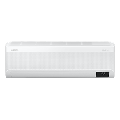

Enjoy a smart way of living
Fast & AI Comfort Cooling
Experience smart living. AI¹ analyzes your usage patterns² and the room conditions so it can automatically activate Fast Cooling. After lowering the temperature, AI switches to WindFree™ Cooling to maintain the ideal conditions. The more you use it, the better it adapts to your tastes³.


Bespoke AI WindFree™ SmartThings
Quick and easy control on a smartphone
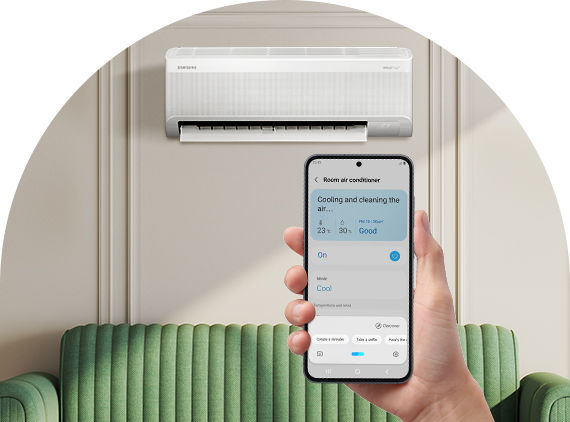
Quick Remote
Control the room temperature quickly and easily on a Galaxy smartphone¹¹. When you get close to the air conditioner¹², a Quick Remote pops up on your phone¹³ to let you control its priority features, like on/off and start/stop.¹⁴. So don’t need to waste time finding the actual remote control.


Discover more products
1. AI = Artificial Intelligence. A Wi-Fi connection and Samsung SmartThings application account are required.
2. Stores user data, preferences and usage patterns, enabling it to suggest the most comfortable room temperature set point within a range of 22 °C to 26 °C.
3. Available on Android and iOS devices. A Wi-Fi connection and a Samsung account are required.
4. AI energy mode learns patterns and adjusts temperatures in advance to reduce unnecessary usage. The set temperature may increase by up to 2 degrees. Requires the use of the SmartThings App and a Samsung account.
5. Accordingly to internal testing.
6. The SmartThings AI Energy mode, when used by the end-user, can provide users with a possibility to save energy and/or costs with regard to their domestic hot water usage based on (repeatable) user patterns. All savings are estimates. The actual savings vary and depend on, amongst others, usage, costs and operating conditions.
7. It can be used when linking a Samsung smartphone with Samsung software One UI version 4.0 or later and a wearable device that supports Wear OS: Galaxy Watch 4 or later, Fit 3 or later, Galaxy Ring.
8. You must download the Samsung SmartThings App on the wearable device and connect the air conditioner to your home Wi-Fi. You can set it in the Samsung Watch App's 'Sleep well with smart devices' or Settings > Mode and routine > Sleep menu, and you must wear the device while sleeping. SmartThings is optimized for Samsung smartphones and Galaxy Watches, and some functions may be limited when used on smartphones and watches from other manufacturers.
9. Available on Android and iOS devices. A Wi-Fi connection and a Samsung account are required.
10. Dry comfort is available in all countries where the WindFree™ units are installed. However, the benefit of this feature adds more value in humid and tropical climates.
11. Only available when using Samsung Galaxy smartphones. A Wi-Fi connection and a Samsung account are required.
12. The air conditioner must be connected to the Wi-Fi network and registered in the SmartThings App. Only certain models of air conditioners manufactured in 2024 or later are supported.
13. The automatic activation time varies depending on the user environment.
14. The controllable functions of compatible devices may vary depending on their specification or the usage environment, especially B2B products and some special models manufactured in 2024.
15. Available on Android and iOS devices. A Wi-Fi connection and a Samsung account are required.
16. Available on Android and iOS devices. A Wi-Fi connection and a Samsung account are required.
17. The Welcome & Away Care (energy saving notification) function uses smartphone Geofencing and GPS to determine whether you are close to your personal set location, and its performance may vary depending on the actual usage environment and the cooling function of each model.
18. Available on Android and iOS devices. A Wi-Fi connection and a Samsung account are required.
19. A Wi-Fi connection is required.
20. Bixby is Samsung’s brand of Internet of Things (IoT) voice assistant. Bixby service availability may vary depending on the country. Bixby recognizes selected languages and certain accents/dialects. The user interface may change and differ by device. The availability of Bixby features and content providers may vary depending on the country/carrier/language/device model/OS version. A Samsung account log-in and data network connection (Wi-Fi or data network) are required.
21. Amazon, Alexa, and all related logos are trademarks of Amazon.com, Inc. or its affiliates.
22. Google is a trademark of Google LLC.
Stay informed
Subscribe to our newsletter to receive the latest product innovations, updates, and much more.
Contact us
Reach out to our sales team to ask any questions you may have and discuss the best options for your business.